Getting-paid guides · 19
Upwork withdrawal fees in 2026: which method keeps the most of your earningsWhat Upwork charges for each withdrawal method, how long each takes, and the exchange rate cost that usually decides it, by where you live and how much you withdraw.
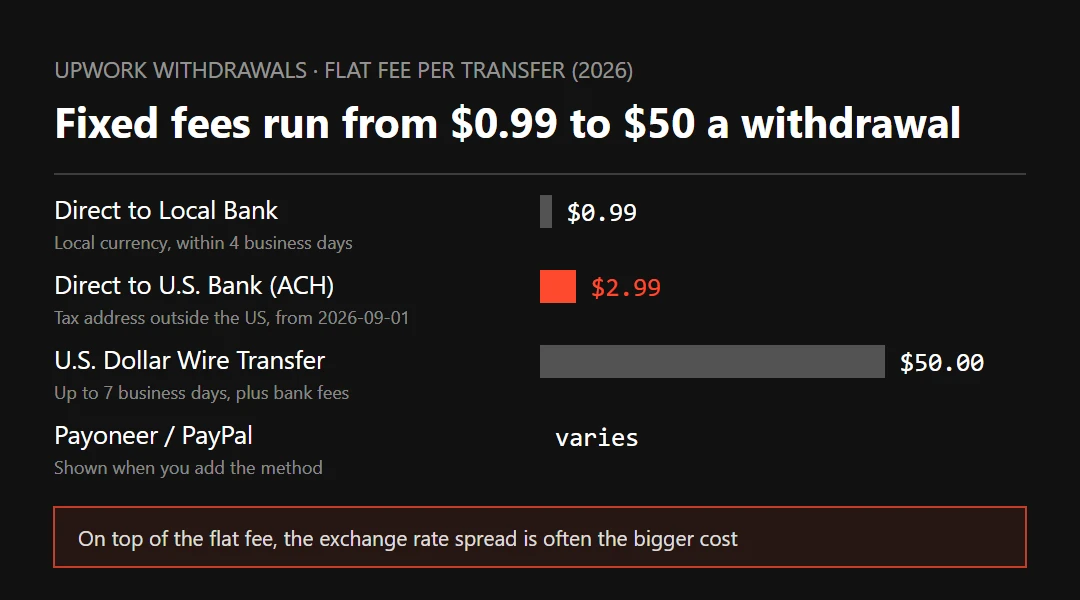
If you live outside the US, this is how most Upwork withdrawals shake out. Use Direct to Local Bank if your currency is supported: $0.99 a transfer, within four business days, converted at Upwork's own rate. If you already have a Wise USD account and withdraw larger amounts, send dollars there with Direct to U.S. Bank and convert them yourself; since September 1, 2026 that costs $2.99 a transfer. Use Payoneer when local bank isn't available or you want to hold dollars. A $50 dollar wire only pays off on very large amounts.
On this page
- Upwork withdrawal methods: fees and timing
- The new $2.99 fee on Direct to U.S. Bank (from September 2026)
- The exchange rate is the big cost, and local bank uses Upwork's
- Withdrawing $1,000 a month: what four routes cost
- Which withdrawal method fits your situation
- When earnings become available, and the three-day wait
- Withdrawal missing or bounced: what to check
- The service fee and the withdrawal fee are separate
- FAQ
- What to read next
01Upwork withdrawal methods: fees and timing
These figures come from Upwork's 2026 help center pages on fees and timing. Which methods you can pick depends on the tax address you gave Upwork and the country you're in; the options appear when you add a withdrawal method.
| Method | Upwork fee per transfer | Who can use it | Arrives in | Other costs |
|---|---|---|---|---|
| Direct to Local Bank (local currency) | $0.99 | Outside the US, supported currencies | Within 4 business days; same-day processing before 12:00 noon UTC | Upwork's exchange rate spread; incoming fees at some banks |
| Direct to U.S. Bank (ACH, dollars) | Free with a US tax address; $2.99 with a tax address outside the US (from 2026-09-01) | US accounts that accept ACH, including Wise and Payoneer USD receiving accounts | 2 to 5 business days | Conversion fees at the receiving account |
| U.S. Dollar Wire Transfer | $50 | Bank accounts that accept USD wires | Sent within 1 business day, up to 7 to arrive | Intermediary and receiving bank fees; your bank's exchange rate |
| Payoneer | Small flat fee, shown when you add it | Outside the US and India | Usually within 24 hours | Payoneer's conversion, bank withdrawal, account and card fees |
| PayPal | Small flat fee, shown when you add it | Depends on your PayPal region | Mostly instant, up to 24 hours | PayPal's conversion and withdrawal fees; some regions treat it as a payment for services |
For PayPal and Payoneer, Upwork's help center only says it charges "a small fee per transfer". The exact amount is listed next to each method under Settings › Withdrawals › Add a method, so look there before you add one. Plenty of roundups online quote $2 a transfer; we couldn't confirm that figure on Upwork's own help pages. Freelancers in the US can also use Instant Pay at $2 a transfer, and freelancers in Kenya can withdraw to M-Pesa. Fiverr works differently; its methods and fees are in Fiverr withdrawal fees and methods.
02The new $2.99 fee on Direct to U.S. Bank (from September 2026)
Upwork's Direct to U.S. Bank page says withdrawals stay free for freelancers with a US tax address. If your tax address is outside the US, each withdrawal costs $2.99 from September 1, 2026. Withdrawals scheduled before that date go through free; anything started on or after it, or scheduled to run on or after it, is charged.
The people most affected are those who collect Upwork earnings into a Wise or Payoneer USD receiving account. Those accounts give you US account and routing numbers, which Upwork treats as Direct to U.S. Bank. That used to cost nothing and now costs $2.99 each time. What counts is the tax address on your Upwork profile, not where the account is held.
Since the fee is per transfer, the simplest fix is to withdraw less often:
- Switch an automatic weekly withdrawal to monthly. Four transfers a month cost $11.96; one at month end costs $2.99. Change the schedule under Settings › Withdrawals.
- If each withdrawal is small, check whether Direct to Local Bank works out cheaper; section 04 shows the sum.
- If you keep money on Upwork for Connects or a membership, set a reserve balance. Automatic withdrawals leave it alone, and you can still withdraw it by hand.
03The exchange rate is the big cost, and local bank uses Upwork's
$0.99 and $2.99 are both flat fees. On a $1,000 withdrawal they differ by $2. What really pulls the routes apart is whose exchange rate turns your dollars into local currency.
Upwork works in dollars. If you take local currency through Direct to Local Bank, Upwork converts at a rate it sets before paying your bank. Wise's help article on receiving money from Upwork says the same thing, and suggests taking dollars and converting inside Wise instead.
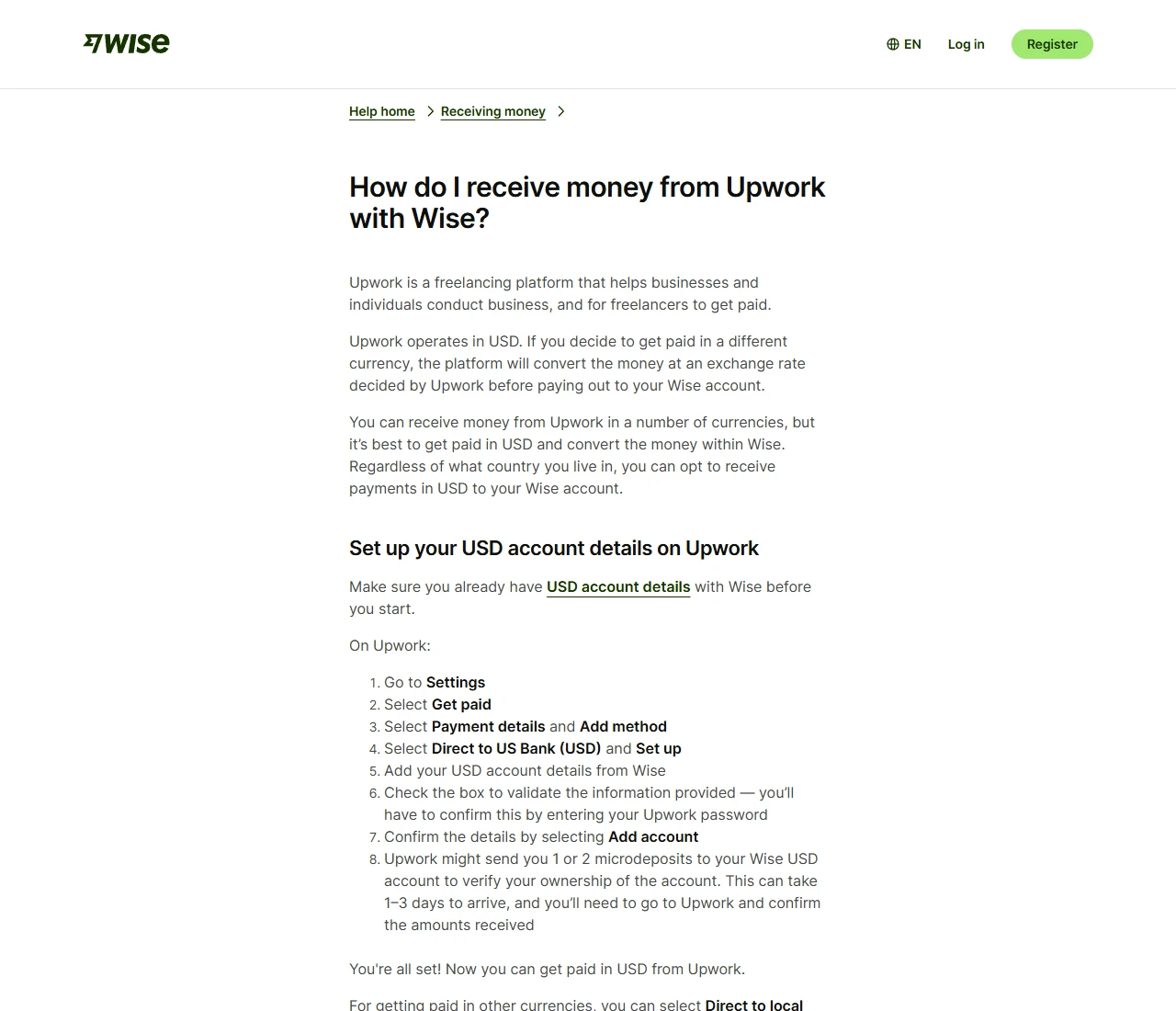
Upwork doesn't publish how far its local bank rate sits from the mid-market rate. The reliable way to find out is to measure one real withdrawal:
- Note the dollar amount of the withdrawal and subtract the $0.99 fee.
- When it lands, note the local-currency amount your bank credited.
- Look up the mid-market rate for that day on Wise, XE or your central bank's site.
- Divide the local amount by (dollars withdrawn − 0.99) to get the rate you actually got. The percentage it falls short of the mid-market rate is this route's conversion cost; add any incoming fee your bank charged.
Measure the Wise route the same way: enter the same dollar amount on Wise's conversion page and note the fee and what you'd receive. Put the two side by side and you know which route is cheaper for your currency. One measurement lasts for months; redo it if either side changes its pricing.
04Withdrawing $1,000 a month: what four routes cost
This table only shows the method. The two conversion costs are assumptions: Upwork's local bank rate 1.5% below mid-market, and a 0.6% Wise conversion fee. Plug in the figures you measured for your own currency.
| Route | Flat fees per month | Conversion cost (assumed) | Total per month, about |
|---|---|---|---|
| Local bank, once at month end | $0.99 | 1,000 × 1.5% = $15 | $16 |
| Local bank, weekly (4 times) | $3.96 | $15 | $19 |
| Direct to U.S. Bank into Wise, once at month end | $2.99 | 1,000 × 0.6% = $6 | $9 |
| Direct to U.S. Bank into Wise, weekly (4 times) | $11.96 | $6 | $18 |
The rule boils down to one line. The two flat fees differ by $2 ($2.99 − $0.99), so the Wise route wins whenever "amount per withdrawal × the gap in conversion cost" is more than $2. At $1,000 a withdrawal, a 0.2% gap is enough; at $200, the gap has to reach 1%. Small, frequent withdrawals favour local bank; saving up and withdrawing once lets Wise's rate show.
To see how the conversion costs break down across channels, run the same amount through our Wise vs Payoneer take-home comparison.
05Which withdrawal method fits your situation
- Outside the US, and your currency is supported: do one withdrawal by local bank, measure the conversion cost as in section 03, then decide whether to switch.
- Already on Wise, withdrawing a few hundred dollars or more: use Direct to U.S. Bank into your Wise USD account, withdraw once a month, and convert when the rate suits you.
- Your currency isn't supported, or the local bank cap is too low: use Payoneer or a Wise USD account. Local bank limits vary by country: Brazil has a $12 minimum and $3,000 maximum, Nigeria $3,000, Pakistan $8,999, Japan $8,500.
- In India: Upwork's Payoneer page covers freelancers outside India and the US only, and PayPal India may classify Upwork transfers as payments for services and charge extra. Look at local bank first.
- US tax address: Direct to U.S. Bank is free and arrives in two to five business days; if you need the money sooner, Instant Pay costs $2 a transfer.
- Several thousand dollars at once, and your bank charges little for incoming dollar wires: the wire fee is a flat $50, so it shrinks as the amount grows. An intermediary bank may still take a cut and your bank may convert at its own rate, so ask your bank what it charges first.
Add at least two withdrawal methods. Upwork recommends a backup too, so you can still get your money out if the main one fails. It's the same logic as not keeping all your income in one channel.
06When earnings become available, and the three-day wait
Money in your Upwork balance isn't always ready to withdraw. Upwork holds it for a set time depending on the contract type:
- Hourly contracts: hours are billed weekly, Monday to Sunday, and become available ten days later, on the following Wednesday.
- Fixed-price contracts and Project Catalog: five days after the client approves a milestone.
- Bonuses: five days after the client's payment is processed.
A new withdrawal method becomes active three calendar days after you add it, for security reasons. Email addresses, bank account numbers and bank codes can't be edited; if one changes, add a new method, wait the three days again, then remove the old one. The safest move is to enter your tax information and withdrawal method before you take your first contract.
07Withdrawal missing or bounced: what to check
- The name: the name on your withdrawal account must match your verified Upwork name, including middle names, extra family names and special characters. If it's flagged, add a method in your own name, or reply to Upwork's email to show you're an authorised user.
- The bank code: failed local bank withdrawals most often come from a wrong bank code or account number. Check them with your bank before entering them; if your name is too long for the field, ask the bank for an accepted abbreviation.
- The waiting time: if a local bank transfer hasn't arrived after four business days, ask your bank first; after eight business days Upwork can trace it. For ACH, contact Upwork after five business days.
- Whether it bounced: a withdrawal can't be cancelled once started. Money sent to an invalid or closed account usually returns to your Upwork balance in four to eight business days.
If less arrived than you expected, an intermediary or receiving bank most likely took a fee, which happens most with wires. How to read the transfer record and find who deducted it is in troubleshooting delayed or bounced payments.
08The service fee and the withdrawal fee are separate
Before money reaches your Upwork balance, Upwork deducts its Freelancer Service Fee, which ranges from 0% to 15% depending on the contract. You see the rate when you send a proposal or receive an offer, and it doesn't change once the contract starts. The withdrawal fee comes off later, when money leaves Upwork, so count the two separately.
Upwork's help center gives an example: to take home $20 an hour with a 10% fee, charge $22.22. When you quote, add back the service fee, the withdrawal fee and the conversion cost; the method is in the day-rate and project pricing section of how to set your freelance hourly rate. If a client is refunded, Upwork returns the service fee on the refunded amount.
09FAQ
How much does it cost to withdraw from Upwork to Payoneer?
Both sides take a share. Upwork charges a small flat fee per transfer, listed next to Payoneer under Settings › Withdrawals › Add a method. Payoneer may charge for currency conversion, withdrawing to a bank, account maintenance and ATM use; check the fees page inside your Payoneer account. Money usually reaches Payoneer within 24 hours. Freelancers in the US and India can't use Payoneer on Upwork.
How do I withdraw from Upwork to Wise?
Get your USD account details in Wise first. In Upwork, go to Settings › Withdrawals › Add a method, choose Direct to U.S. Bank, enter the Wise account and routing numbers, and confirm with your Upwork password. Upwork may send one or two small test deposits to Wise, which take 1 to 3 days; enter the amounts in Upwork to finish. With a tax address outside the US, this route costs $2.99 per withdrawal from September 1, 2026.
How long does an Upwork withdrawal take?
Direct to Local Bank arrives within four business days, ACH in two to five, a dollar wire is sent within one business day and can take up to seven, Payoneer usually within 24 hours, and PayPal is mostly instant but can take up to 24 hours. A newly added method only becomes active after three days, so add it before your first contract.
What is the minimum withdrawal on Upwork?
Direct to Local Bank starts at $5 and is higher in some countries, such as $12 in Brazil and $101 in Barbados. Many countries also have a per-transfer maximum, for example $3,000 in Brazil and Nigeria. Payoneer and PayPal set their own minimums and limits.
Can I cancel an Upwork withdrawal?
No. Once a withdrawal starts it can't be cancelled or pulled back. If it went to an invalid or closed account, it usually bounces back to your Upwork balance in four to eight business days; if it doesn't, contact Upwork support.
10What to read next
- Upwork Help: How to get paid on Upwork
- Upwork Help: Direct to U.S. Bank: timing and fees explained
- Upwork Help: What are the fees, limits, and timing of Direct to Local Bank payments?
- Upwork Help: How do wire transfers work on Upwork?
- Upwork Help: How quickly Payoneer pays and what fees apply
- Upwork Help: What are the PayPal fees and timing for withdrawals?
- Upwork Help: Learn about the Freelancer Service Fee
- Wise Help: How do I receive money from Upwork with Wise?
Fees and limits change. Before you withdraw, check the figures shown in your own account under Settings › Withdrawals › Add a method.